> ## Documentation Index
> Fetch the complete documentation index at: https://docs.zyme.sh/llms.txt
> Use this file to discover all available pages before exploring further.
# Create Workflow
> Learn the fastest way to create and manage workflows in zyme.
## Overview
Workflows define a sequence of actions for your process. Each workflow belongs to a specific project or team and usually requires a name or title, while all additional settings (like triggers or templates) are optional.
## Quick creation methods
* **Press `W`** anywhere in the app to open the "Create Workflow" modal instantly.
* **Click the “New” button**, located in the sidebar or top toolbar.
* **Use our API** to programmatically create workflows—ideal for integrating with external tools or automating creation.
## Creating a new workflow
When you open the **Create Workflow** modal, you’ll see fields to define the title, URL, description, and optional labels for your workflow.
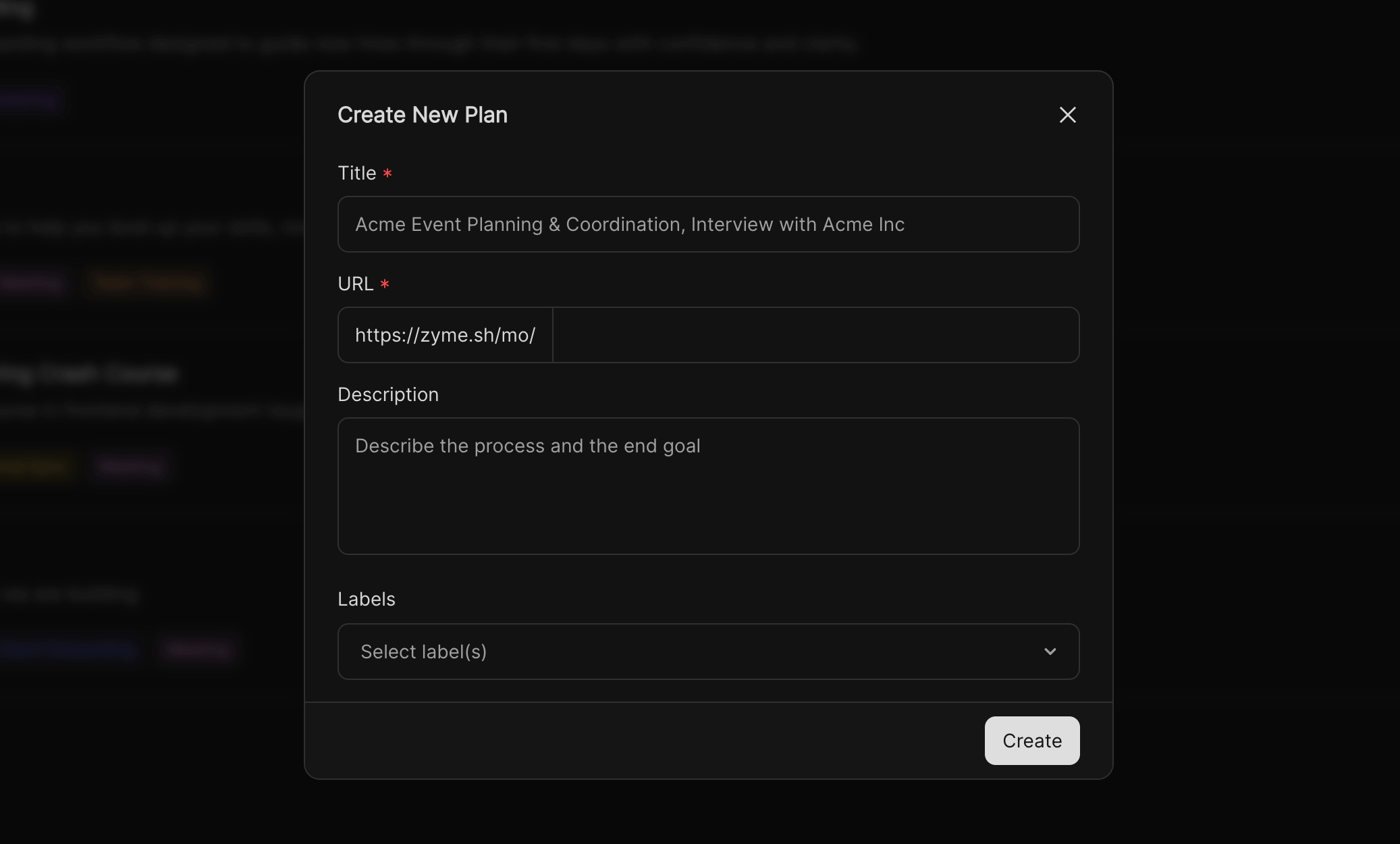 Use the shortcut **`W`**, click the **New button**, or trigger workflow creation via API.
Give your workflow a clear and descriptive name, such as\
*Acme Event Planning & Coordination* or *Interview with Acme Inc*.\
This makes it easier for your team to identify and reuse workflows.
Each workflow generates a unique link (e.g. `https://zyme.sh//`).\
You can edit this to make the URL easy to remember and share.
Summarize the purpose, process, and expected outcome of the workflow.\
A good description helps teammates understand context before they start using it.
Use labels to group workflows by category, team, or priority.\
This makes searching and filtering easier across your organization.
Once all fields are set, click **Create**.\
Your new workflow will be instantly available and you can start to customize it.
Use the shortcut **`W`**, click the **New button**, or trigger workflow creation via API.
Give your workflow a clear and descriptive name, such as\
*Acme Event Planning & Coordination* or *Interview with Acme Inc*.\
This makes it easier for your team to identify and reuse workflows.
Each workflow generates a unique link (e.g. `https://zyme.sh//`).\
You can edit this to make the URL easy to remember and share.
Summarize the purpose, process, and expected outcome of the workflow.\
A good description helps teammates understand context before they start using it.
Use labels to group workflows by category, team, or priority.\
This makes searching and filtering easier across your organization.
Once all fields are set, click **Create**.\
Your new workflow will be instantly available and you can start to customize it.